

Transformation: Pad Columns
The Pad Columns transformation in Nexadata Pipelines adds one or more new columns to a dataset in a single step. Each column is appended to the end of the dataset with a name, a data type, and a value.
Its main use is padding a dataset that is missing columns a downstream pipeline expects. A source that has not produced a given column yet, or a smaller entity that does not use every segment a larger one does, will return fewer columns than the pipeline is built for. Pad Columns adds the missing ones so the output schema stays the same regardless of what the source returned.
It is also useful any time you need several blank or default-value columns at once, without adding a separate Insert Column step for each.
Inputs for the Pad Columns Transformation
Section titled “Inputs for the Pad Columns Transformation”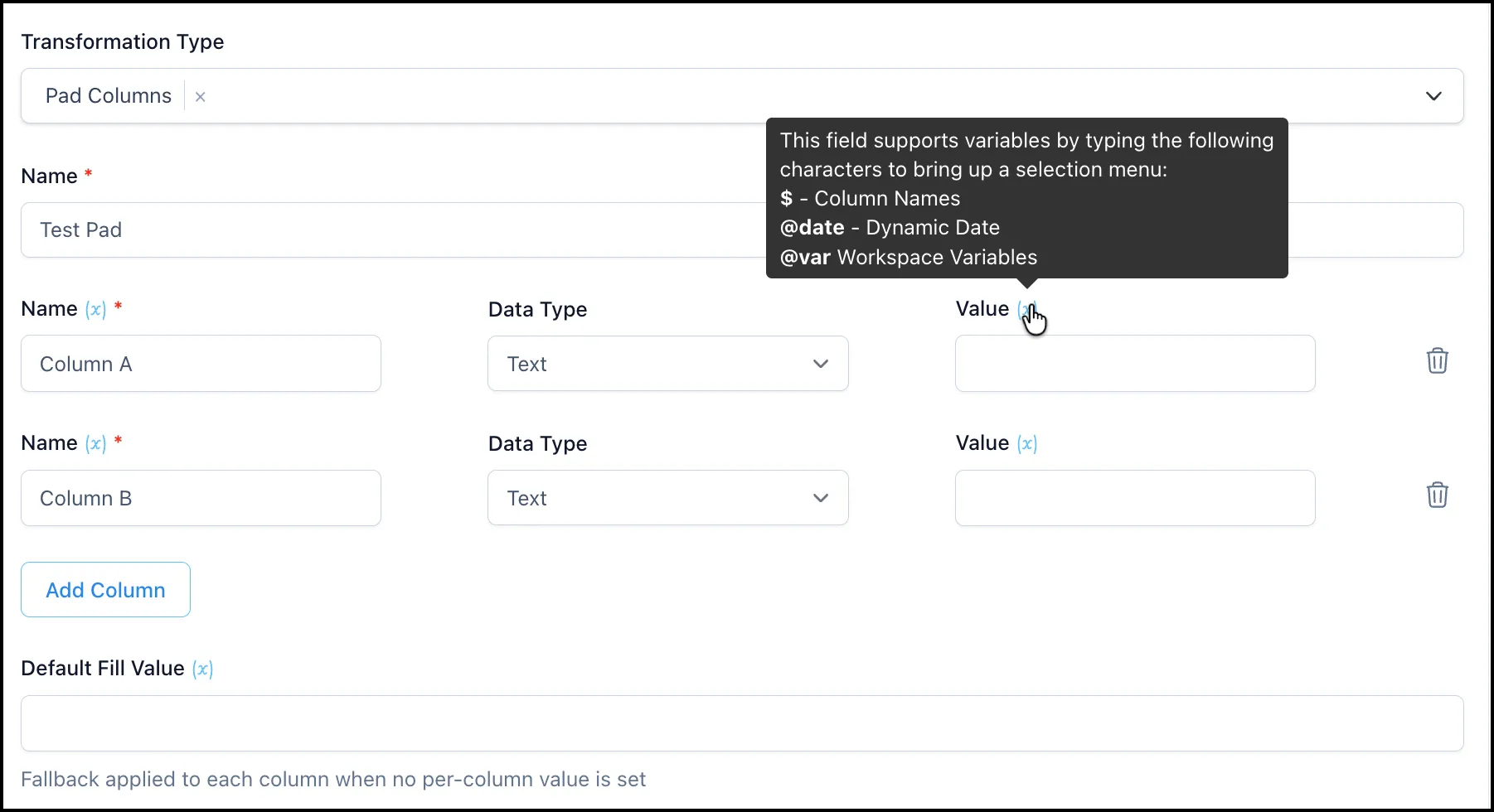
-
Name of the Transformation: A name for the step, for example “Pad Missing Segment Columns”.
-
Columns: One row per column you want to add. Use Add Column for each additional one, and the trash icon at the end of a row to remove it. Each row has:
-
Name (required): The name of the new column.
-
Data Type: The type the new column takes, for example Text, Number, Currency, Percentage, Date, Datetime, Boolean, or Duration.
-
Value: The value written into every row of that column. Leave it empty for a blank column.
-
-
Default Fill Value: A fallback applied to each column that has no per-column Value set. Use it when every padded column should carry the same value, and set a per-column Value only where one column needs something different.
Using Variables in Pad Columns
Section titled “Using Variables in Pad Columns”The Name, Value, and Default Fill Value fields are variable-enabled, marked with an (x) next to the label. Typing one of these characters in the field brings up a selection menu:
-
$inserts a column name -
@dateinserts a dynamic date -
@varinserts a workspace variable
This is what lets a padded column carry a load date, a run timestamp, or a tenant or environment name that comes from a variable rather than being typed in by hand.
Example: Stabilizing an Output Schema
Section titled “Example: Stabilizing an Output Schema”A pipeline is built to produce a fixed set of columns, but one source system does not return SEGMENT_3 or COST_CENTER because that entity does not use them. Without those columns the downstream pipeline fails on a schema mismatch.
Add a Pad Columns step after the source:
-
Name of the Transformation: Pad Missing Segment Columns
-
Columns:
-
SEGMENT_3, Data Type Text, Value empty -
COST_CENTER, Data Type Text, Value empty
-
-
Default Fill Value: (empty)
Both columns are appended and populated as blank, and the output carries the full expected column set no matter which entity the data came from.
Example: Stamping a Load Date
Section titled “Example: Stamping a Load Date”Add two columns that record when the data was loaded and which environment it came from:
-
Columns:
-
LOAD_DATE, Data Type Date, Value@date -
SOURCE_ENV, Data Type Text, Value@varpointing at your environment variable
-
Each row in the dataset gets the same stamped values, resolved at run time rather than hardcoded.
Pad Columns vs Insert Column
Section titled “Pad Columns vs Insert Column”Both add columns, and they overlap. Choose on this basis:
-
Pad Columns adds several columns at once, always at the end, each with a static value or a variable. Use it for schema padding and for bulk defaults.
-
Insert Column adds one column and can position it first, last, or before or after a named column. It also supports formulas that calculate from other columns.
If you need a calculation, use Insert Column. If you need five blank columns so a pipeline stops failing, use Pad Columns.
Summary
Section titled “Summary”The Pad Columns transformation adds one or more columns to the end of a dataset in a single step, each with its own name, data type, and value, plus an optional Default Fill Value as a fallback. It is the direct way to keep an output schema stable when different sources return different column sets, and the fields support dynamic dates and workspace variables for values that should resolve at run time.