

Executing Workflows via the Nexadata API
The Nexadata REST API supports programmatic execution of Workflows, allowing you to trigger and monitor runs from any external system or automation. This article covers how to authenticate, execute a Workflow, and poll for its status using the API.
Prerequisites
Section titled “Prerequisites”Before executing a Workflow via the API, make sure you have:
-
A valid Bearer token generated from your OAuth client (see Setting Up the Nexadata REST API)
-
The ID of the Workflow you want to execute. You can find this in the URL when viewing a Workflow in Nexadata — it is the numerical value following
/workflow/in the address bar. 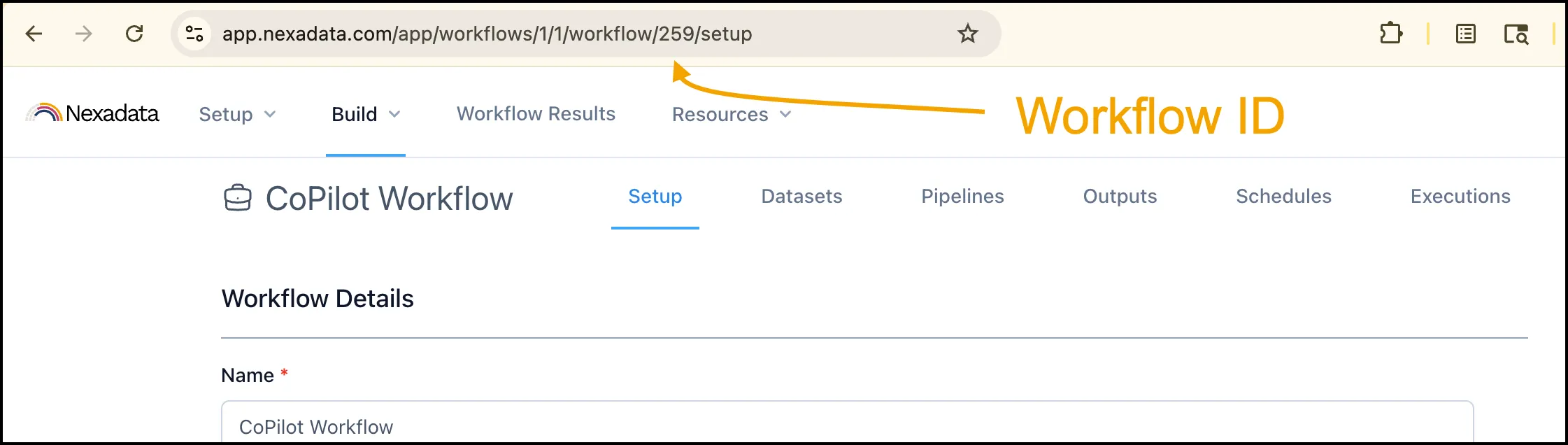
Executing a Workflow
Section titled “Executing a Workflow”To queue a Workflow for execution, send a POST request to the execute endpoint, replacing :id with your Workflow’s ID and including your Bearer token in the Authorization header.
curl -X POST https://app.nexadata.com/api/v1/workflows/29/execute \ -H"Authorization: Bearer <your_token>" \ -H "Content-Type:application/json"A successful request returns a 200 OK response with an execution record in created state:
{"id": 170, "state": "created", ...}Polling for Execution Status
Section titled “Polling for Execution Status”Workflow executions are processed asynchronously. To check the status of an execution, send a GET request using the execution ID returned in the previous step.
curl https://app.nexadata.com/api/v1/workflows/executions/170 \ -H "Authorization: Bearer <your_token>"The response includes the full execution record with state, start, and end timestamps, and any errors or warnings:
{"id": 170, "state": "succeeded", "start_at": "...", "end_at": "..."}Possible execution states are created, running, succeeded, and failed. Poll the status endpoint periodically until the execution reaches a terminal state (succeeded or failed).
Once an execution has succeeded, you can download its output dataset. See Downloading Workflow Output via the Nexadata API.
Authorization and Access Control
Section titled “Authorization and Access Control”Access to the API is scoped to your organization. The API validates that your token belongs to an organization that has access to the requested Workflow or execution. Requests for Workflows or executions outside your organization return a 404 response.