Mapping Group Management in a Pipeline
When using Mapping Groups within a Nexadata Pipeline, you have several powerful management options to control, view, and update how mappings are applied across your data. Here’s a guide to these key capabilities:
View Mapping Group Usage
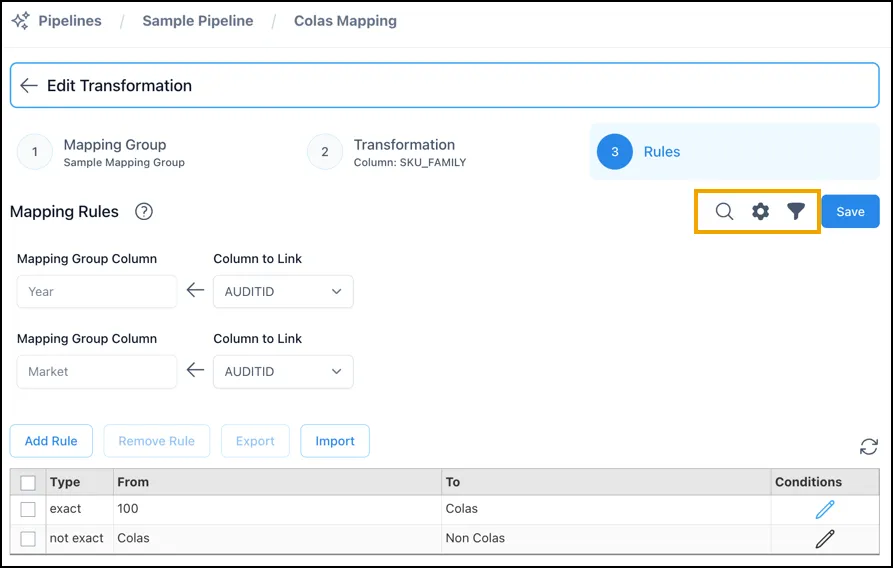
Section titled “View Mapping Group Usage”Click the magnifying glass icon to view all pipelines where the selected Mapping Group is used. This feature helps track dependencies and understand the potential impact of updates on other pipelines.
Configure Mapping Group Settings
Section titled “Configure Mapping Group Settings”The gear icon allows you to access and adjust the case sensitivity and effective start and end times for the Mapping Group. These settings control whether mapping rules should be case-sensitive and when they are active, providing flexibility for time-based mapping requirements.
Toggle Unmapped Rows
Section titled “Toggle Unmapped Rows”Click the funnel icon to filter the dataset, allowing you to show or hide rows that are not mapped by the current Mapping Group. This feature helps you isolate unmapped data for targeted review and action.
Update the Mapping Group as Needed from Within a Pipeline
Section titled “Update the Mapping Group as Needed from Within a Pipeline”You can make adjustments to the Mapping Group directly from within the pipeline to keep your mappings relevant and effective:
-
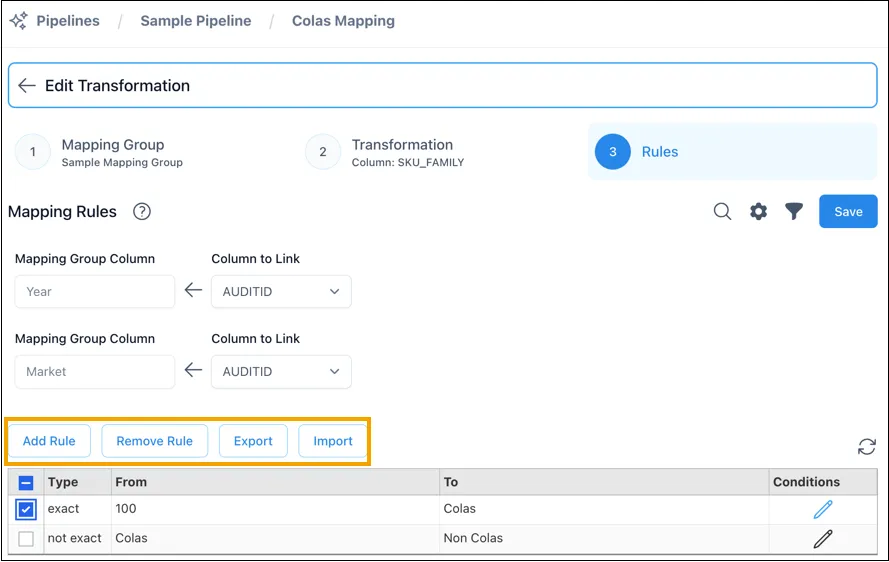
Add or Remove Rules: Refine the Mapping Group by adding new mapping rules or removing outdated ones.
-
Export and Import Rules: Export mapping rules for backup or external use, or import rules from a file to quickly populate or update mappings.