Step 10 - Create an Anaplan-Sourced Dataset
🔍 What You’re Doing
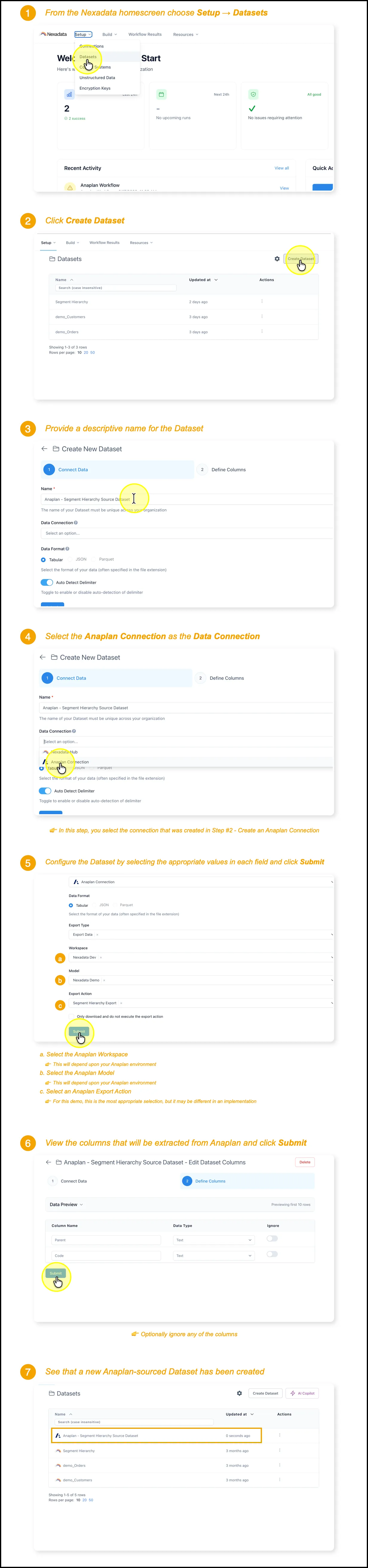
Section titled “🔍 What You’re Doing”In this final step, you’ll create a Dataset in Nexadata that connects directly to Anaplan as the data source. This allows you to pull data from Anaplan—such as Modules or Lists—into Nexadata for downstream use in Workflows or Pipelines.
✅ Summary of Steps
Section titled “✅ Summary of Steps”-
Navigate to Setup → Datasets and click Create Dataset.
-
Name your dataset and select the Anaplan connection.
-
Configure the import settings and column options.
-
Click Submit to create the Anaplan-sourced dataset.