Setting up an Amazon S3 Connection
This guide will walk you through the steps of setting up an Amazon S3 connection for your organization. Follow the instructions below to establish a secure connection to your S3 bucket.
Step-by-Step Instructions
Section titled “Step-by-Step Instructions”Step 1: Add a Connection
Section titled “Step 1: Add a Connection”Get started and add a connection.
-
From the Nexadata home screen, click the Create a Connection tile or navigate to Setup—> Connections—> choose the ⨁ button in the upper right-hand corner.
-
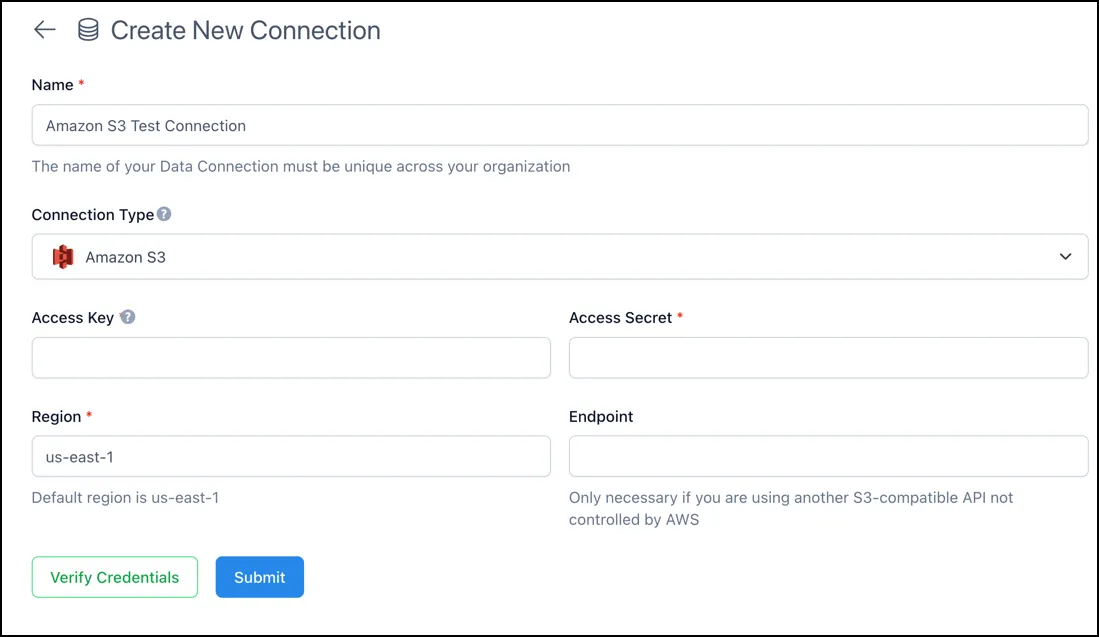
The Create New Connection form will display.
-
Provide a unique Name for your data connection. This name should clearly identify the connection within your organization.
-
Select Amazon S3 as the Connection Type.
Step 2: Enter Your Amazon S3 Credentials
Section titled “Step 2: Enter Your Amazon S3 Credentials”You will need to enter your Access Key and Access Secret to authenticate the connection with Amazon S3.
-
Access Key: Input the Access Key ID generated from your AWS IAM (Identity and Access Management).
-
Access Secret: Provide the Secret Access Key associated with your Access Key. Ensure you keep this information secure.
Step 3: Specify the Region
Section titled “Step 3: Specify the Region”Region: Enter the AWS region where your S3 bucket is located. By default, it may be set to us-east-1, but you should change it if your bucket is in a different region.
Step 4: (Optional) Configure Endpoint
Section titled “Step 4: (Optional) Configure Endpoint”Endpoint: This field is only necessary if you are using an S3-compatible API that is not controlled by AWS. Otherwise, you can leave this blank.
Step 5: Verify Credentials
Section titled “Step 5: Verify Credentials”Before submitting the connection details, click Verify Credentials to ensure the provided Access Key and Access Secret are valid and have the appropriate permissions for the S3 bucket.
Step 6: Submit the Connection
Section titled “Step 6: Submit the Connection”Once your credentials are verified, click the Submit button to finalize the connection setup. Your Amazon S3 connection should now be active and ready for use.