

Step 5 - Review the Results and Schedule the Workflow
🔍 What You’re Doing
Section titled “🔍 What You’re Doing”Everything is built, so the last step is to run the Workflow, look at what came out, and put it on a schedule.
Run the Workflow and let it complete, then walk the Output Pipeline from its first transformation to its last. That walk is worth taking once, because it shows exactly what the audit log gained on the way through.
✅ Summary of Steps
Section titled “✅ Summary of Steps”-
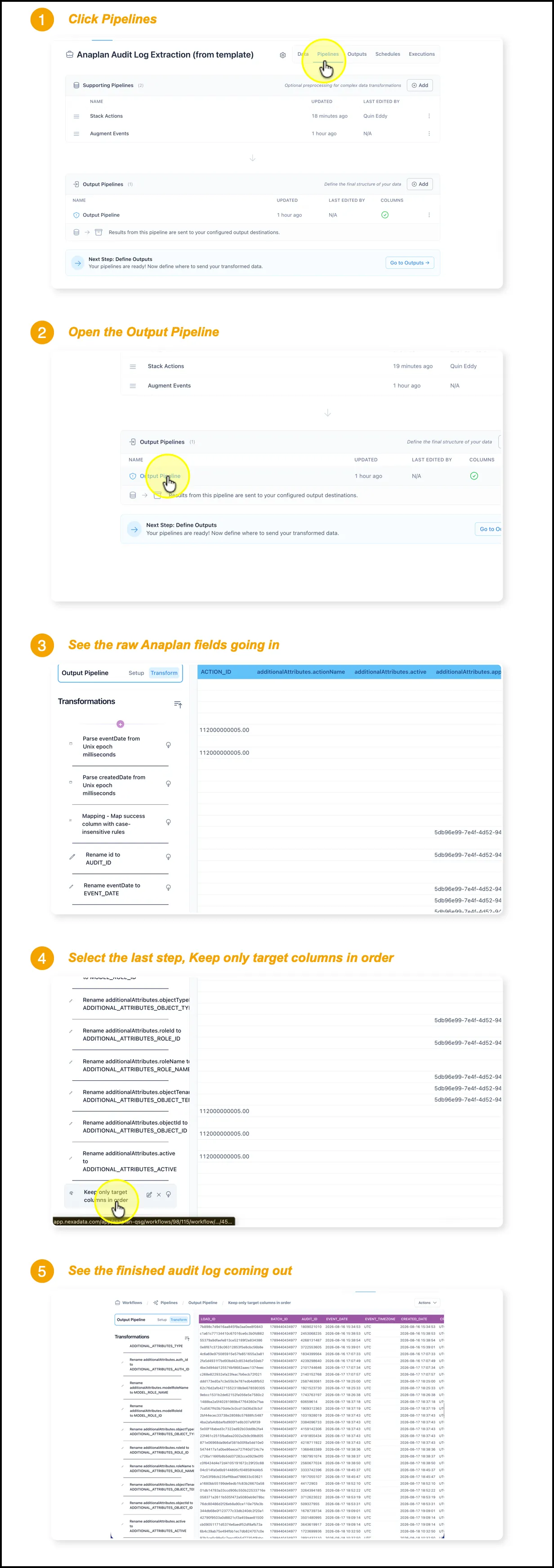
Click Pipelines.
-
Open the Output Pipeline.
-
See the raw Anaplan fields going in.
-
Select the last step, Keep only target columns in order.
-
See the finished audit log coming out.
The first transformation shows what Anaplan actually returns: sparse columns with names like additionalAttributes.actionName, IDs with no context, and timestamps as Unix epoch milliseconds. The last one shows the finished audit log: AUDIT_ID, EVENT_DATE, EVENT_TIMEZONE, USER_NAME, WORKSPACE_NAME, MODEL_NAME, ACTION_NAME and the rest, in a fixed order, fully populated, ready to hand to a BI tool without further work.
Set the Events Interval Back to 24
Section titled “Set the Events Interval Back to 24”This is a reminder rather than new setup. You chose this value back in Step 1, when you created the Anaplan - Events dataset and set Interval (hours) wide enough to backfill real history. This is the point in the process where you change it.
The dataset is still pointed at that wide lookback, so once the initial load is done, narrow it.
| Run | Interval (hours) | Covers |
|---|---|---|
| Initial load | 720 | 30 days, standard Anaplan retention |
| Initial load | 2160 | 90 days, Anaplan Enterprise, the maximum |
| Every run after | 24 | the trailing day, matched to a daily schedule |
Schedule the Daily Refresh
Section titled “Schedule the Daily Refresh”Use the built-in Nexadata scheduler to run the Workflow every 24 hours so the audit log keeps itself current without anyone starting it by hand. Pair a 24 hour schedule with a 24 hour interval and each run picks up exactly the events since the last one.