

Setting up a Nexadata Hub Connection
The Nexadata Hub is the file store built into every Nexadata tenant. A Nexadata Hub connection lets your Datasets read files from the Hub and lets your Workflows write output and data maps back to it. Because the Hub is part of Nexadata, the connection needs no credentials: you give it a name, pick the type, and submit.
Step-by-Step Instructions
Section titled “Step-by-Step Instructions”Step 1: Add a Connection
Section titled “Step 1: Add a Connection”-
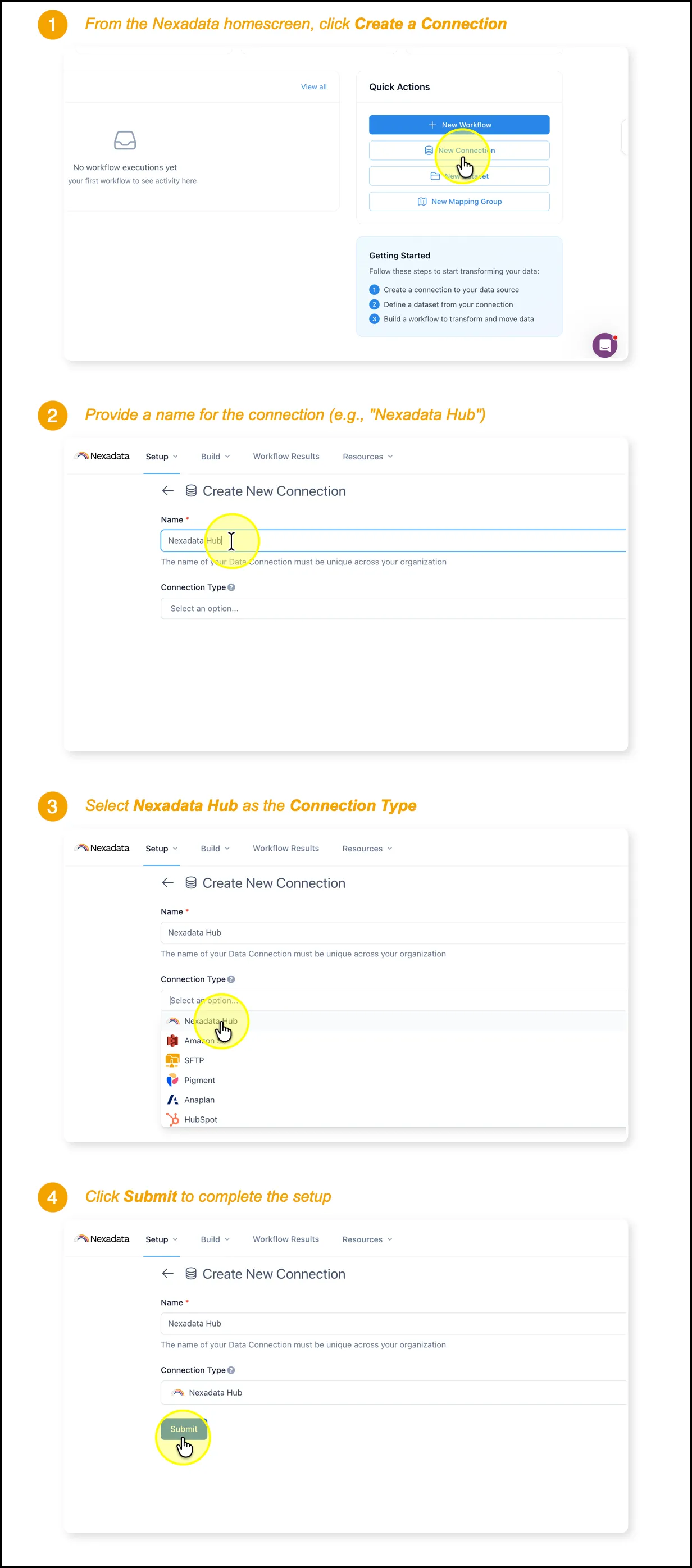
From the Nexadata home screen, click New Connection in the Quick Actions card, or go to Setup > Connections and click the ⨁ button in the upper right-hand corner.
-
The Create New Connection form opens.
Step 2: Name the Connection
Section titled “Step 2: Name the Connection”Enter a unique Name for the connection, for example Nexadata Hub. The name must be unique across your organization.
Step 3: Select Nexadata Hub as the Connection Type
Section titled “Step 3: Select Nexadata Hub as the Connection Type”Open the Connection Type list and select Nexadata Hub.
Step 4: Submit the Connection
Section titled “Step 4: Submit the Connection”Click Submit. Your Nexadata Hub connection is ready to use. There are no credentials to enter or verify.
Next Steps
Section titled “Next Steps”-
Upload files to the Hub with the Nexadata File Manager.
-
Build a Dataset on a Hub file. The Quick Start Guide - Learning Nexadata walks through it with sample data.