

Overview: Build the Anaplan Audit Log Extraction
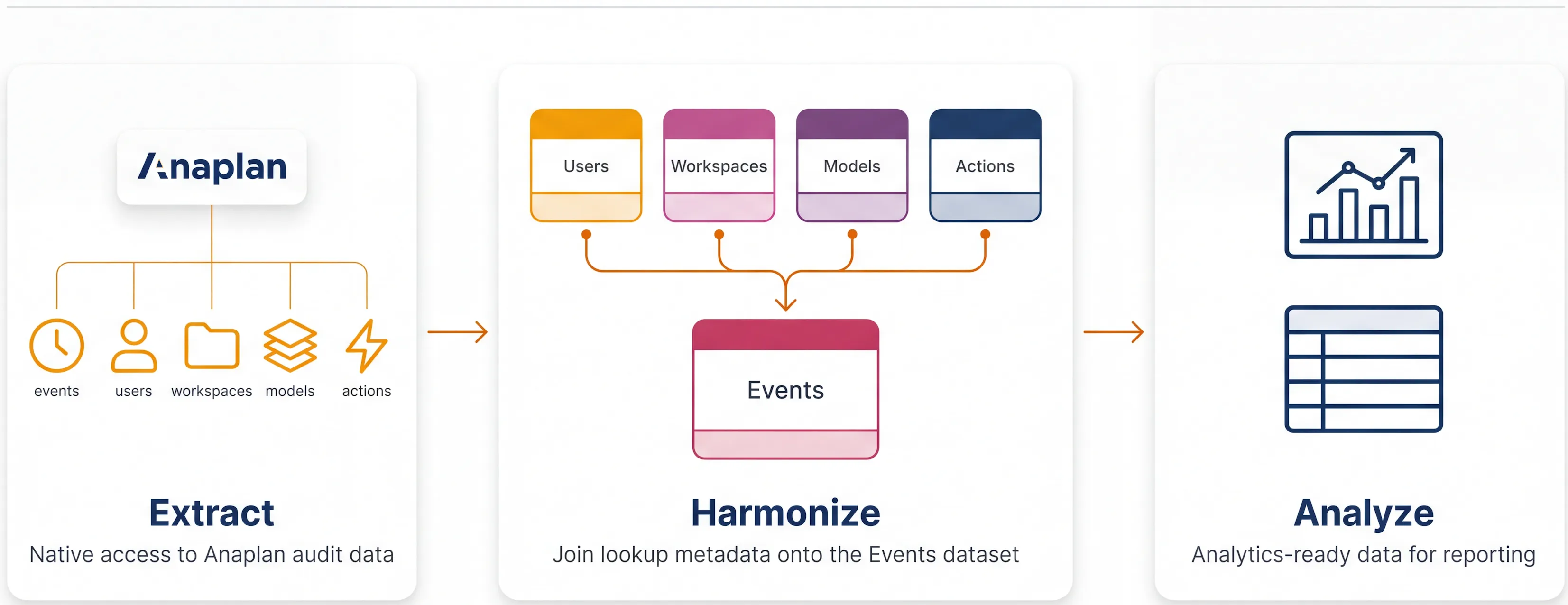
This Quick Start Guide (QSG) walks you through configuring Nexadata to extract extended audit log details from your Anaplan tenant, enrich the raw event codes with readable descriptions, and prepare the data for downstream audit analysis. Anaplan’s native audit log records every user action as a numeric event code. Nexadata translates these codes into meaningful event messages and joins them with user, model, and workspace context, so you can answer compliance and activity questions without manual lookups.
Estimated time: ~20 minutes
🎯 What You’ll Build
Section titled “🎯 What You’ll Build”By the end of this QSG you’ll have a Nexadata Workflow that produces a single enriched audit log dataset on every run. Each record includes:
-
Who: the Anaplan user, as an ID, a username, and a display name
-
Where: the workspace and model the action affected
-
What: the action name, resolved from your Imports, Exports, Processes, and Actions datasets
-
What it means: a human-readable event message, mapped from the raw Anaplan audit code by the template
-
When: the event timestamp, parsed from Unix epoch milliseconds into a clean date and time
You can then schedule this Workflow to run on a cadence and feed the output into BI tools, exports, or alerting systems.
✅ Prerequisites
Section titled “✅ Prerequisites”Before starting this QSG, confirm that two foundational connections are already in place. Both come from the introductory Anaplan QSG. If you haven’t built them yet, complete just those two steps and return here.
Required (from the Anaplan QSG)
🔗 Step 1 - Create a Source Connection to Integrate with Anaplan. Establishes the source connection Nexadata uses to reach your Anaplan tenant.
🔗 Step 2 - Create an Anaplan Connection. Authenticates Nexadata against your Anaplan workspace so it can read audit data.
Recommended
For a broader view of how Nexadata supports Anaplan teams, we recommend the full introductory Anaplan QSG. It covers segment hierarchy automation and other Anaplan use cases:
🔗 Overview: Build a Segment Hierarchy for Anaplan
In this QSG, you’ll work through the following steps:
-
Step 1 - Create the Anaplan Audit Datasets: Build the nine Nexadata datasets that pull each Anaplan audit and administrative data source. (⏱ 10 min)
-
Step 2 - Tag the Anaplan Audit Datasets: Apply a shared “Audit Data” tag to every dataset that feeds the Anaplan audit log workflow. (⏱ 2 min)
-
Step 3 - Import the Anaplan Audit Workflow Template: Import the workflow template to create the Workflow with its pipelines already configured. (⏱ 5 min)
-
Step 4 - Stack Additional Workspace and Model Datasets: Append the action datasets from every additional workspace and model combination onto the Stack Actions pipeline. (only if you audit more than one combination)
-
Step 5 - Review the Results and Schedule the Workflow: Run the Workflow, review the audit output, then narrow the Events interval and schedule a daily refresh. (⏱ 3 min)
Let’s get started!