Step 7 - Execute the Workflow for Anaplan
🔍 What You’re Doing
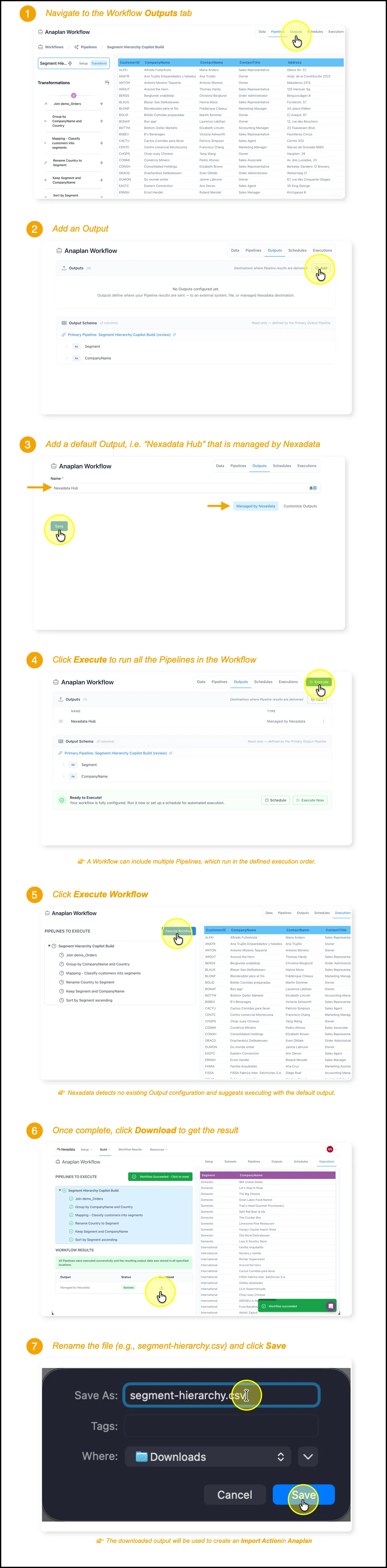
Section titled “🔍 What You’re Doing”In this step, you’ll execute your completed Pipeline and download the final result. The resulting output (a CSV file) contains your transformed and mapped data—perfect for creating an Anaplan Import Action or for use in other tools. You’ll also verify that the default output destination was automatically created by Nexadata.
✅ Summary of Steps
Section titled “✅ Summary of Steps”-
From the Pipelines tab in your Workflow, click Executions.
-
Click Execute Workflow.
-
Select Execute with Default Output.
-
Once execution completes, download the result.
-
Rename the file to something recognizable (e.g.,
segment-hierarchy.csv) and save it. -
Click on Outputs to view the output destination.
-
Confirm that the Nexadata-managed output is listed.