Step 2 - Create an Anaplan Connection
🔍 What You’re Doing
In this step, you’ll connect Nexadata to the Anaplan platform by using your Anaplan credentials (either Basic Authentication or OAuth). This secure connection allows you to access and work with Anaplan data in future workflows. Once the connection is created, it will appear in your Connections list for use across Datasets and Pipelines.
💡 For detailed setup and usage guidance, see the full article: Setting up an Anaplan Connection
✅ Summary of Steps
-
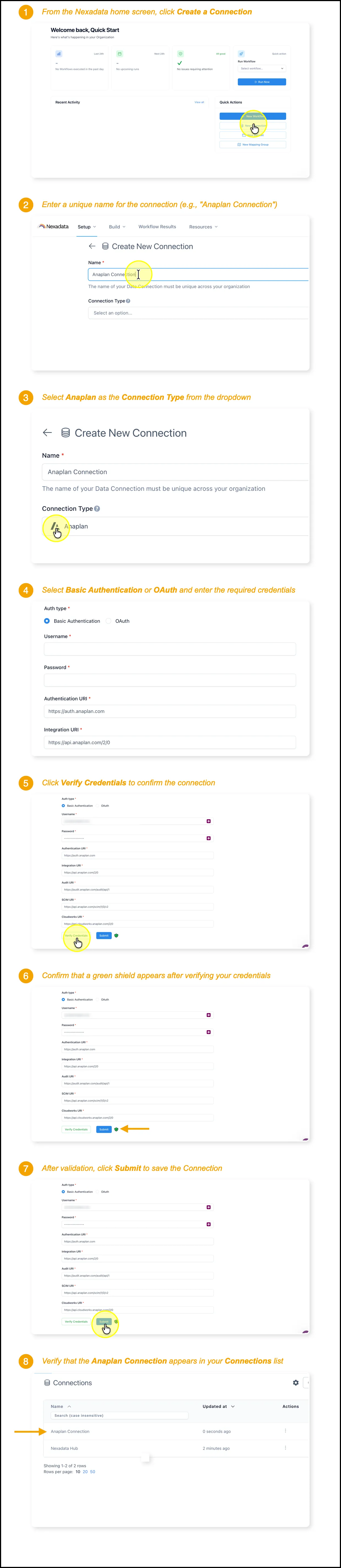
From the Nexadata home screen, click Create a Connection.
-
Enter a unique name for the new connection (e.g., Anaplan Connection).
-
Select Anaplan as the Connection Type.
-
Choose either Basic Authentication or OAuth, and enter the required credentials:
-
Username
-
Password
-
Authentication URI: Pre-filled as
https://auth.anaplan.com -
Integration URI: Pre-filled as
https://api.anaplan.com/2/0*(No need to edit these unless specifically instructed.)*
-
-
Click Verify Credentials and confirm a green shield appears.
-
Once validated, click Submit to save the Connection.
-
Confirm the Anaplan Connection appears in your Connections list.