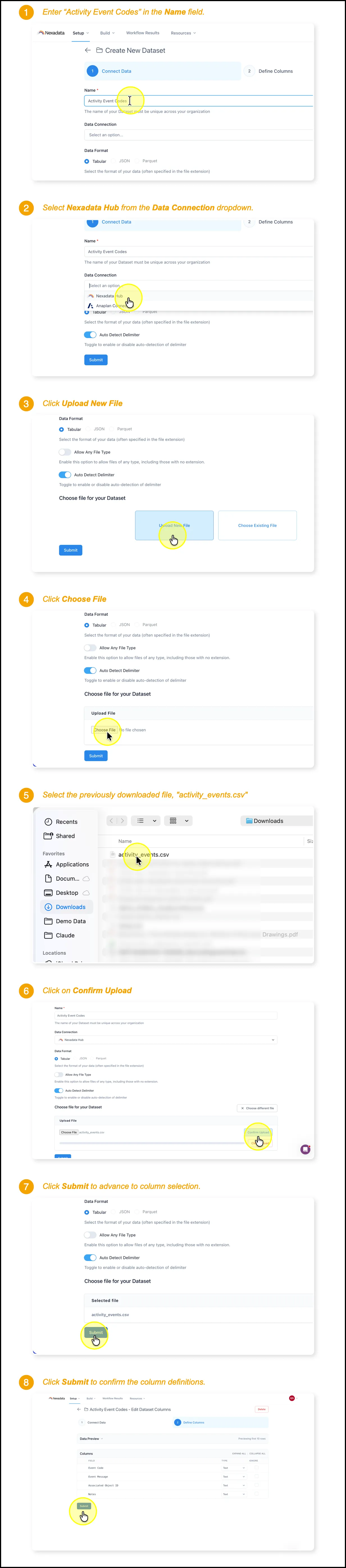
Step 2 - Create the Activity Event Codes Dataset
🔍 What You’re Doing
Section titled “🔍 What You’re Doing”You’re creating a reference dataset in Nexadata that holds the master list of Anaplan audit event codes and their human-readable descriptions. Anaplan’s audit log records each user action as a numeric event code, so this lookup table is what Nexadata uses to translate those codes into meaningful event messages during analysis. Once loaded, this dataset becomes a reusable reference that any downstream audit workflow can join against.
📥 Before You Begin
Section titled “📥 Before You Begin”Download the activity event codes file. Save activity_events.csv to your local Downloads folder. You’ll upload it to Nexadata in the steps below. 🔗 Download activity_events.csv
✅ Summary of Steps
Section titled “✅ Summary of Steps”-
Name the new Dataset Activity Event Codes.
-
Set the Data Connection to Nexadata Hub.
-
Click Upload New File, then Choose File, and select activity_events.csv from your Downloads folder.
-
Click Confirm Upload, then Submit to advance to column selection.
-
Review the column definitions and click Submit to save the dataset.