No prebuilt connector required
Connect to any OpenAPI or OData source
Build a native connector in minutes, not sprints. Point the Connector Copilot at a spec, describe the data you want in plain language, and get back a dataset your pipelines can use.
At a glance
Read-onlyLoad a spec from
- An uploaded YAML or JSON file
- A public specification URL
- A data source you already configured
Authenticate with
- OAuth
- API key
- Basic auth
- Private apps
What you get back
A typed, flattened dataset, ready for pipelines and transforms.
- SOC 2 Type II
- Zero data retention
- SSO / SAML / RBAC
- Cloud-agnostic
The platform processes your data. An LLM never touches it.
The connector
What the Connector Copilot does
Load the spec, however you have it
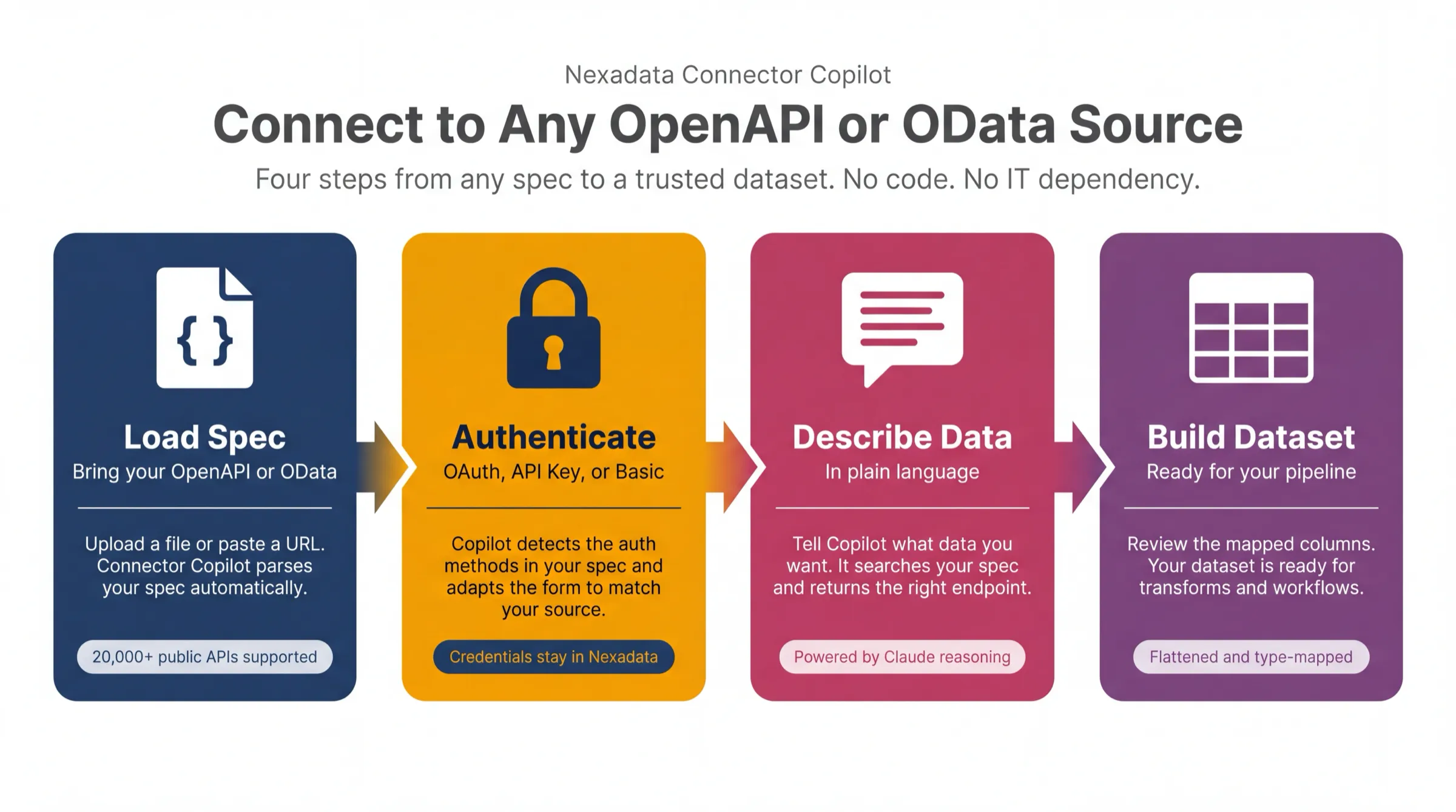
Upload a YAML or JSON file, paste a public URL, or point at a source you already configured. Connector Copilot parses the specification and validates it before you go any further, so a malformed spec fails at the first step rather than three screens later.
Authentication that adapts to the source
The form is built from the spec rather than from a template: OAuth, API key, basic auth or private apps, showing only what your source actually supports. OAuth also takes custom key-value parameters, which is what makes platforms that extend the standard, like Google BigQuery, work rather than silently expiring after an hour. Credentials stay in Nexadata's secrets manager.
Describe the data, not the endpoint
Say what you want in plain language, with as much detail as you like about fields and filters. Connector Copilot searches the spec, returns the endpoints that match, and analyzes the one you pick to work out how the dataset should be shaped. Claude does the reasoning; the spec and the data stay with Nexadata.
A dataset, not a payload
Nested objects are flattened and mapped to typed columns for you to review, with an ignore toggle for the fields you did not ask for and an API-level advanced view for the edge cases that need it. What you end up with is ready for pipelines, transforms and workflows.
When the shape is wrong, it fixes the shape
APIs return what suits the API, not what suits a table: objects inside objects, values spread across rows that belong in columns. The preview asks whether the data looks right, and if it does not, Detect Transformations works out what reshaping is needed and applies it. Flattening a nested response is a button rather than a project.
The catalog stops being the limit
Every integration platform has a list, and your systems are either on it or you are waiting for a roadmap. Connector Copilot replaces the list with a rule: if it publishes a spec, you can read from it. These connections are read-only, which is exactly what makes one safe to stand up in minutes against a system you do not administer. Writing back is what the native connectors are for.
Sources
What you can reach
Examples, not a catalog. None of these has a native Nexadata connector and none needs one, because each publishes a spec the Copilot can read: if a system has an OpenAPI or OData spec, the Connector Copilot reads it and builds a working connection, with no prebuilt connector to wait on.
How it works
From spec to dataset
Connect, transform, map, review. Each step is guided by a no-code copilot, and you approve the plan before anything runs.
- 01
Connect
Load the spec, pick the authentication method it declares, and let Copilot build the connection form to match the source rather than to a generic template.
- 02
Transform
Once the dataset exists it behaves like any other. Join it, filter it and reshape it in plain language with the Transform Copilot.
- 03
Map
Align the values coming back from the API to the dimensions your target model expects, including conditional logic.
- 04
Review
Inspect the proposed columns, drop the ones you do not need, and approve the plan before anything runs.
Use cases
What people run through it
Reach a system nobody built a connector for
Procurement, logistics, industry systems, internal services. If there is a spec, there is a connection, and you are not waiting on a vendor roadmap to get at your own data.
See the full walkthroughStop maintaining glue scripts
The scripts holding a stack together are written once and owned forever, usually by whoever is least able to hand them over. A generated connection is configuration rather than code.
See the platformProve a source before you commit
Stand up a working connection in minutes to find out whether a system holds what you think it does, before anyone scopes a project around the assumption.
Try it freeSet it up
Step-by-step documentation
Every screen, in order, with screenshots.
Nexadata Connector Copilot
The full walkthrough, from loading a spec to confirming columns.
Read the guideCreating a dataset with Connector Copilot
The short version, in the context of building a dataset.
Read the guideNexadata data connections
How connections work across every source type.
Read the guideInteractive connection testing
Check a connection works before you build anything on it.
Read the guideQuestions
Connector Copilot FAQ
- What do I need to connect to a system with no prebuilt connector?
- Its OpenAPI or OData specification, as an uploaded YAML or JSON file or a public URL. Over 20,000 public APIs are documented this way on directories such as APIs.guru, and most internal services generate a spec too.
- Which authentication methods are supported?
- OAuth, API key, basic auth and private apps. The options shown are the ones your spec declares rather than a fixed list. OAuth also accepts custom key-value authorization parameters, which is what makes sources that extend the standard work properly instead of authenticating once and breaking when the token expires.
- Do I need to know which API endpoint I want?
- No. Describe the data in plain language and Connector Copilot searches the spec and returns the endpoints that match, then analyzes the one you choose to work out how to structure the dataset. There is an advanced view if you do know the API and want to see exactly what it is doing.
- Can Connector Copilot write data back to the source system?
- No. Connections it builds are read-only, bringing data into Nexadata as a dataset. That is deliberate rather than a gap: read-only is what makes it reasonable to stand up a connection in minutes against a system you do not administer. Writing back is what the native connectors are for, and Anaplan, Pigment, HubSpot and Salesforce all support it.
- Does my data go to the AI model?
- No. The reasoning runs on the specification and your description of what you want, not on your records. The platform processes your data and an LLM never touches it.
- What do I get at the end?
- A dataset with nested objects flattened into typed columns, which you review and trim before saving. From there it behaves like any other Nexadata dataset in pipelines, transforms and workflows.
More integrations
Other ways to connect
Pigment
Read from and write to Pigment blocks, views and lists, with column validation on every writeback.
ExploreAnaplan
Reach past your models into Anaplan's own tenant data, and load results back through the actions your model already runs.
ExploreHubSpot
Read any standard or custom object with its associations, and write results back with upsert, create or update.
ExploreSalesforce
Pull via SOQL or saved reports, tune extract mode for volume, and write back with insert, update, upsert or delete.
ExplorePDF documents
Detect and curate the tables inside a document, then reuse that configuration on every later file in the same layout.
ExploreSpreadsheets
Point at the sheet and the cell where the real data starts, and load a clean typed table out of a messy workbook.
ExploreSee it on your data
Start free with your first use case, or talk to us about your stack.