Hi there,
Nexadata now has a Databricks connector, and it works in both directions: read tables, views, and query results into datasets, transform and harmonize them, and write the results back to a Databricks table.
Alongside it: a File Manager you can actually organize, Workflow output you can pull straight from the REST API, and a new home for our documentation.
🔄 Two-Way Databricks
More and more finance and operations teams stage their data in a Databricks lakehouse governed by Unity Catalog. Getting that data into a planning process is one problem. Getting the results back is the one that usually ends in a custom script.
Why Write Back
A lakehouse records what happened. A planning system holds what the business intends: forecasts, allocations, and plan versions the model calculates, plus the assumptions and adjustments planners enter by hand. That data is created in the planning system and lives nowhere else, so the lakehouse never sees it.
Writing it back completes the picture. Plan sits next to the actuals it is measured against, governed the same way, and ready for every report, model, and AI workload that already reads from Databricks.
Two Ways to Read
- From a share. Your admin places selected tables and views in an OpenSharing share (Databricks’ new name for Delta Sharing), and Nexadata reads only what is in it. This is the easiest path for an admin to approve.
- With a SQL statement. Run your own query on a SQL warehouse, so you can filter, join, and aggregate inside Databricks before anything moves.
Write Back to Databricks Tables
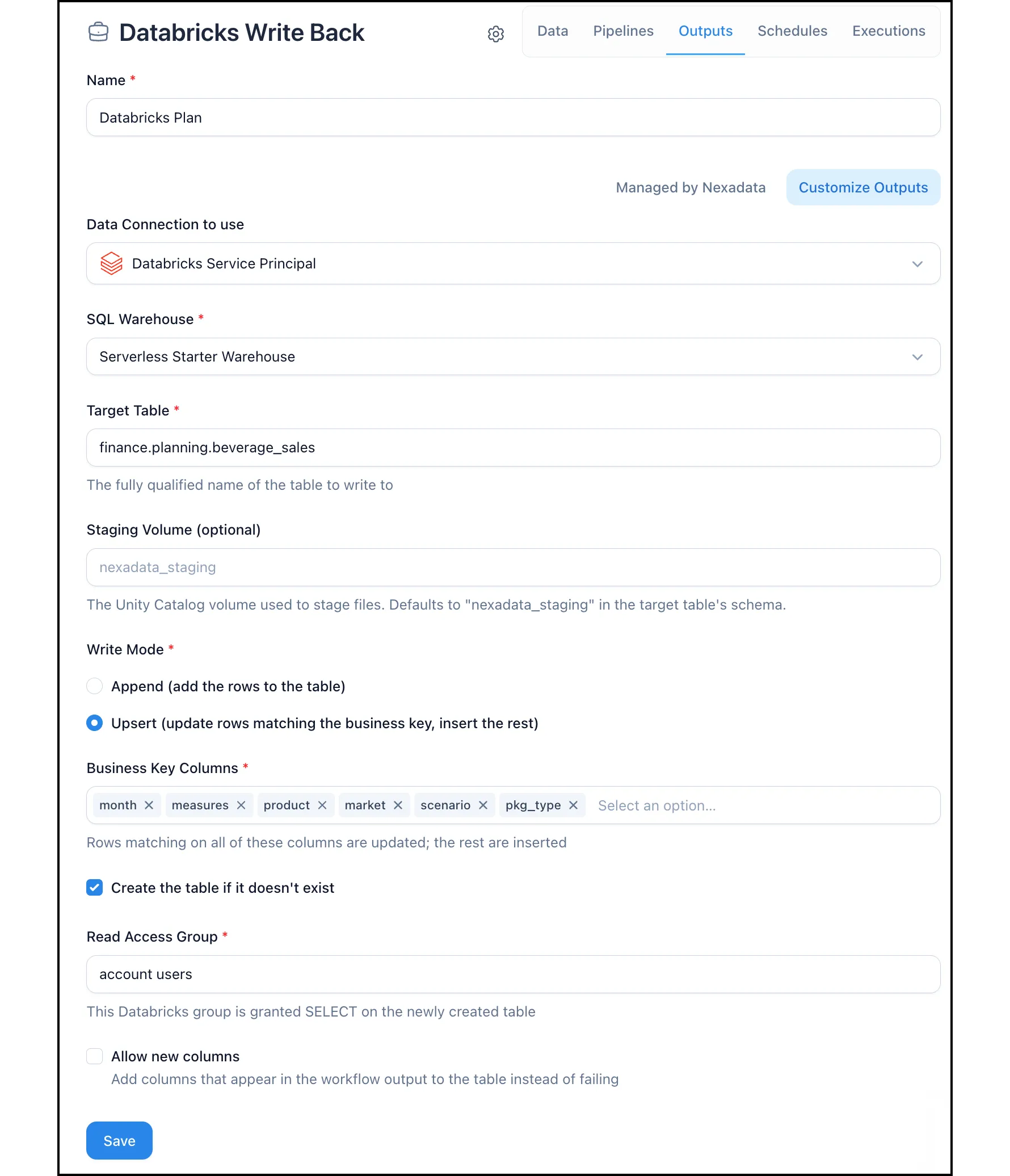
Send any Workflow output to a Databricks table:
- Append adds every row on each run.
- Upsert updates rows that match a business key you choose and inserts the rest, so a plan version restated each cycle updates in place instead of piling up duplicates.
Nexadata can create the table on the first run. Every column is written at an explicit type, so financial amounts tie to the cent. Every row is stamped with the ID of the Workflow run that wrote it in a nexadata_run_id column, so any row in the table traces back to its run.
Three Ways to Connect
- Service Principal: the default, and the recommended choice for SQL reads and write-back. Nexadata authenticates as an account made for an application, so access is easy to review and revoke and does not depend on any one person.
- App Connection: you sign in to Databricks yourself, and Nexadata acts as you, with every action recorded under your name.
- OpenSharing Profile: read-only access to a share.
One Service Principal connection covers both reading and writing.
📄 Setting up a Databricks Connection →
📄 Use Case: Round Trip Between Databricks and Nexadata →
🗂️ A File Manager You Can Organize
The Nexadata File Manager used to be a flat list: upload and view, nothing else. It now has the tools to keep a Hub tidy:
- Folders: create them, nest them up to four levels deep, and open them through a breadcrumb trail
- Rename and move: one file at a time, or check several and act on the selection
- Download: a copy of any file, with the original left in place
- Archive and restore: archived files move to an Archived tab, where you can restore them for 30 days before they are deleted automatically
- Search: by name, with wildcards such as
*.csv
A file that a Dataset reads from cannot be archived. Nexadata lists the Datasets that use it instead, with a link to each one.
Managing files requires the Data Admin role.
📄 Managing Files with the Nexadata File Manager →
📥 Download Workflow Output Through the API
Every Workflow run now saves its output dataset as a CSV file, and two new REST API endpoints return it:
GET /api/v1/workflows/executions/:execution_id/outputreturns the output of a specific runGET /api/v1/workflows/:workflow_id/outputreturns the output of the most recent run
A downstream system can pick up results directly, without re-running the Workflow or reading from a destination system. Pair it with the execute endpoint to trigger a run, poll it until it succeeds, and download what it produced. Both endpoints use the same Bearer token as the rest of the API, and there is no limit on the number of records.
📄 Downloading Workflow Output via the Nexadata API →
📚 A New Home for the Docs
Our documentation now lives at nexadata.com/docs, alongside the rest of the site. It is more complete than before, with new guides for Databricks, Salesforce, the File Manager, and roles and permissions, and built-in search gets you to the right article faster. Existing docs.nexadata.com links redirect automatically.
🧱 Platform Fixes
- ENG-1039 · Bug Fix: An Anaplan audit Events dataset returned only the first 20 records when its Workflow was executed, while design mode showed the full set. Execution now returns every record in the configured interval.
- ENG-1069 · Bug Fix: Anaplan OAuth connections failed when the Anaplan OAuth client was set to rotatable refresh tokens. They now stay connected with either setting.
- ENG-1068 · Bug Fix: The Anaplan connection form now shows Test Connection when OAuth is selected, so you can validate credentials and endpoint URIs before saving.
- ENG-1070 · Bug Fix: Salesforce now requires PKCE on every new External Client App, which broke Customer Managed connections at login. Nexadata now supports PKCE and an optional My Domain URL.
- ENG-1055 · Bug Fix: When a supporting pipeline was picked as the Dataset to Join, the Column in Secondary Dataset list showed only some of its columns. Every output column is now available as a join key.
- ENG-1056 · Bug Fix: The Merge transformation now combines columns in the order you select them, so you no longer need a second step to rearrange the merged value. See Transformation: Merge.
🔭 What’s Next
Nexadata Self-Hosted. We’re packaging Nexadata to run from Docker inside your own infrastructure, so Workflows can reach on-premises sources the SaaS platform cannot:
- Your infrastructure: Nexadata and its file storage run in your environment, with no inbound ports required
- Your AI key: Copilot and the other AI features run on your own Anthropic API key
- Documentation first: requirements, a quickstart, and a configuration reference on our docs site
Thanks for being part of the Nexadata journey!
The Nexadata Team