Hi there,
Build a workflow once, then stand it up again anywhere. That is what this release is about.
Any working workflow can now be saved as a template and applied in another workspace, environment, or tenant. Alongside it: a real two-tier access model, conditional find and replace, and a Pigment connection that takes one API key instead of four.
🧩 Reusable Workflow Templates
Some workflows have a fixed shape. A monthly trial balance load is the clearest case: same source system, same output layout, always two supporting pipelines and one output pipeline. Standing it up for the next entity meant building it again. A finance team with ten subsidiaries built it ten times.
Now you save the working workflow as a template file. It captures the pipelines, the dataset requirements, and the required columns. Create a new workflow, apply the template, and the pipelines arrive configured. You add the datasets and set any workspace variables it uses.
No prompt, no tokens, same result every time.
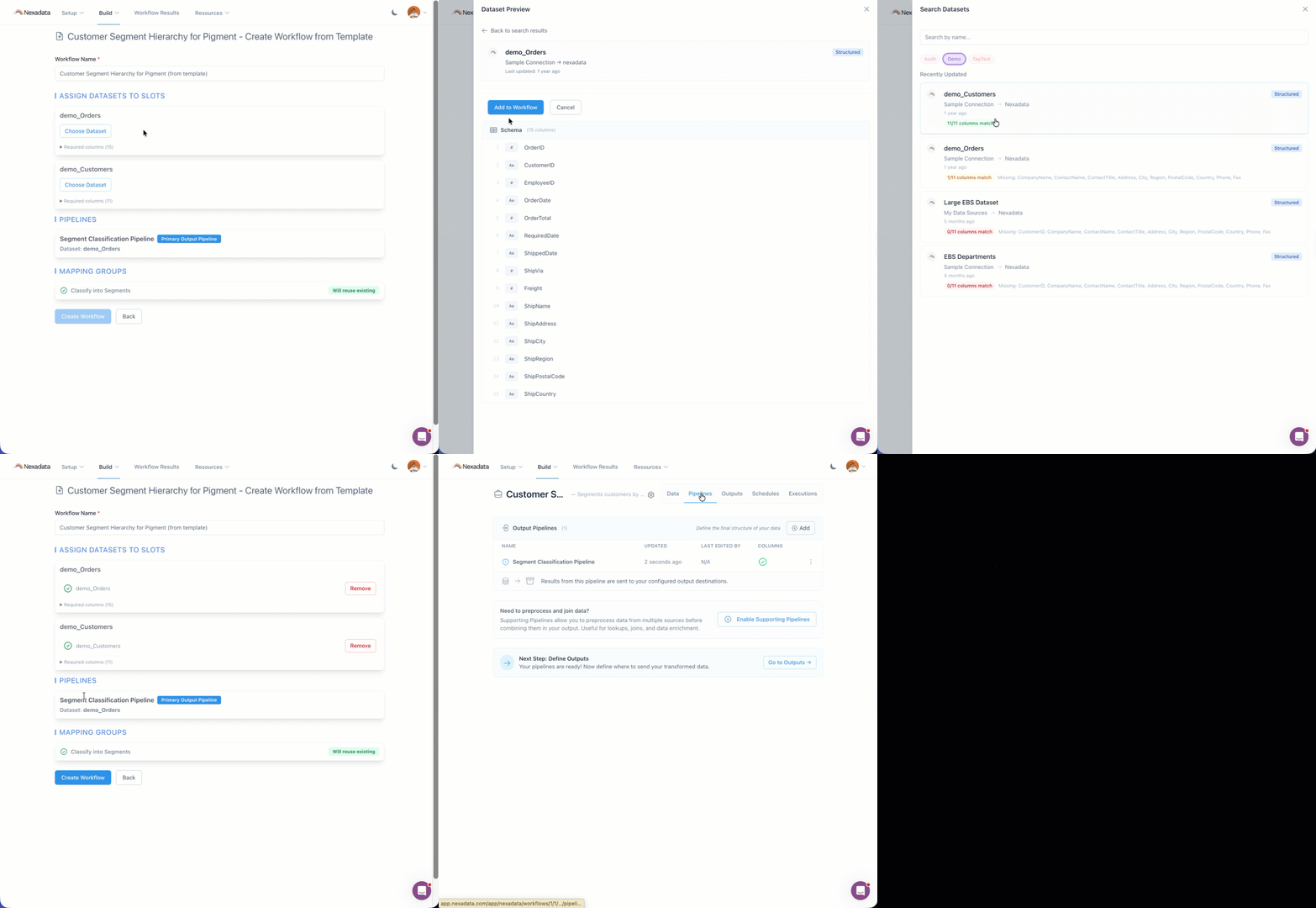
Sources That Return Different Columns
Not every source returns the same column set. A smaller subsidiary legitimately has no rows for segments it does not use, so its export comes back narrower than a larger one.
Templates do not paper over this for you. Handle it with a Pad Columns step in the pipeline, covering the columns that can be absent. Because a template captures every transformation in its pipelines, that step travels with the template and applies everywhere it is used. Dataset-count validation still runs and tells you exactly what is wrong when it fails.
Mapping Groups Come Along
Mapping group definitions and their rules serialize into the template and get recreated on import, wired back to the transformation that uses them. Export and import round-trip intact.
Templates Are Files
There is no template library and no in-product lifecycle this release. You share a template by sharing the file. We will look at a management experience once we see how you use these.
📄 Creating a Workflow from a Template →
🔐 Org Roles and Workspace Permissions
Access control now splits two questions that used to be tangled: which parts of the application a user can reach, and what that user can do with resources inside a Workspace.
Roles gate application areas at the Org level. There are three, independently assignable:
- Workflow Access: see the Workflows section
- Data Admin: edit Connections, Datasets, and Mapping Groups
- Security Admin: update Org settings, including the roles and permissions on other users
Permissions grant resource access at the Workspace level. They attach to a User Group, and every member inherits them:
- Viewer reads
- Executor reads and executes
- Editor reads, executes, edits, and deletes
Permissions cascade from the Workspace to every Workflow and child object: Schedules, Pipelines, Outputs. They are deliberately not assignable per Workflow, which keeps you out of the support conversation about why one person sees ten Workflows and their colleague sees five.
Defaults are permissive. A new invite gets all Roles, and the inviter can deselect any of them before sending. The default User Group grants Editor on all Workspaces. Nobody is restricted until a Security Admin decides they should be. Every check is enforced server-side.
🔁 Conditional Find and Replace
Replace hit every matching row in a column. There was no way to scope a substitution based on what other columns were doing, which is an ordinary ask in EPM and GL shaping. Getting it done meant filtered supporting pipelines stacked back together, or a Mapping Group that could not evaluate column state the same way.
Replace now takes an optional condition set, using the same structure as Filter and conditional Flip Sign: scalar, column, and percentage comparators, and and or logic, nested groups. With conditions set, only matching rows change and everything else passes through untouched. Column references use the existing $ColumnName convention in both the conditions and the replacement value, so a replacement can pull from another column on the same row.
“Where Amount Type is Credit, replace Segment 2 with the value in Cost Center” is now one step.
It works the same way in the interface, the MCP server, and the AI Copilot. Saved Replace transformations run unchanged.
➕ Pad Columns
A new transformation that adds several columns at once, each appended to the end of the dataset with its own name, data type, and value.
It exists for the case above: a pipeline expects a fixed set of columns, and a given source does not return all of them. Rather than a separate Insert Column step for every gap, Pad Columns takes the whole list in one step, and a Default Fill Value covers every column you do not give a specific value.
The Name and Value fields accept variables, so a padded column can carry a dynamic date or a workspace variable instead of a typed-in constant. Type $ for a column name, @date for a dynamic date, or @var for a workspace variable.
Use Insert Column when you need one column in a specific position or a value calculated from other columns. Use Pad Columns when you need several columns to exist so the schema lines up.
📄 Transformation: Pad Columns →
🔗 One Pigment API Key
Pigment consolidated its API key model. One key now carries the Import, Export, and Metadata scopes.
The connection form follows. Four fields become one. On save, Nexadata detects which scopes the key carries and stores them with the connection, and the connection test reports back what it found, so an under-scoped key surfaces at setup instead of mid-run.
Existing connections on the four-key model are migrated or flagged in the interface.
📄 Setting Up a Pigment Integration →
🧱 Platform Fixes
Two worth calling out, because both returned data that looked complete and was not.
- ENG-1027 · Bug Fix: Anaplan audit object exports returned only the first 100 records. A tenant with a thousand users got a hundred of them, no error and no warning, so the workflow finished green on an incomplete output. Pagination now runs across every audit object, including Users, Imports, Exports, Files, Actions, Processes, Models, and Workspaces, and keeps requesting pages until the API says there are none left.
- ENG-1028 · Bug Fix: The Anaplan audit Events export stopped at 10,000 records, the per-response maximum for that endpoint. It now pages through the full result set and merges it before returning. Preview mode deliberately fetches the first 1,000 so the Pipeline view stays responsive on large audit datasets.
🔭 What’s Next
The Nexadata File Manager is getting the management tools it has been missing. Today it is effectively read-only: you can upload and view files, but you cannot delete one, move one, organize into folders, or download anything back out. Files pile up in a flat space and storage cannot be reclaimed.
Next release adds the full set:
- Folders: create, rename, and nest them, with duplicate-name validation
- Multi-select: checkbox, shift-click, and select-all, with Download, Move to, and Move to Trash on the selection toolbar
- Move: drag and drop or a folder picker, with a Keep both / Replace / Cancel prompt on a name conflict. References resolve by file ID, so moving a file never breaks a Dataset, Workflow, or Pipeline that uses it
- Download: a single file keeps its original name and type, and a multi-item selection or a folder comes down as a zip that preserves the folder structure, served through short-lived signed URLs
- A 30-day Trash: Move to Trash is the only delete you perform from the file list, and an undo toast takes it back. Trashed files leave browse, search, and every file picker, keep their original path for an exact restore, and show days remaining. Purge is counted per file, 30 days from when that file was trashed
- Role-gated access: a workspace permission governs who can organize files, not who can use them. Users without it keep referencing File Manager files normally in dataset creation, workflow configuration, and every other file picker
Trashing a file that an active Dataset, Workflow, or Pipeline depends on warns you first and names what references it.
Thanks for being part of the Nexadata journey!
The Nexadata Team