Hi there,
Nexadata now has a Snowflake connector, and it works in both directions: read query results into datasets, transform and harmonize them, and write the results back to a Snowflake table.
Alongside it: Nexadata Self-Hosted, which runs Nexadata inside your own infrastructure, Mapping Groups that an AI assistant can reuse across pipelines through the Nexadata MCP server, and Workspaces and Labels that stay where you left them.
🔄 Two-Way Snowflake
Many finance and operations teams already keep their actuals in Snowflake, curated by a data team and read by every report downstream. Getting that data into a plan is one problem. Getting the plan back into Snowflake is the one that usually ends in a custom script.
Why It Matters
Snowflake records what happened. A planning system holds what the business intends: forecasts, allocations, and plan versions the model calculates, plus the assumptions and adjustments planners enter by hand. That data is created in the planning system and lives nowhere else, so Snowflake never sees it.
Writing it back puts plan next to the actuals it is measured against, governed the same way, and ready for every report, model, and AI workload that already reads from Snowflake. And the finance team runs it, not a data engineering queue.
Read With a SQL Statement
Run your own SQL statement on a warehouse you choose, so you can filter, join, and aggregate inside Snowflake before anything moves. Amounts stored with decimals, such as NUMBER(18,2), arrive in Nexadata with the same precision, with no setup.
Write Back to Snowflake Tables
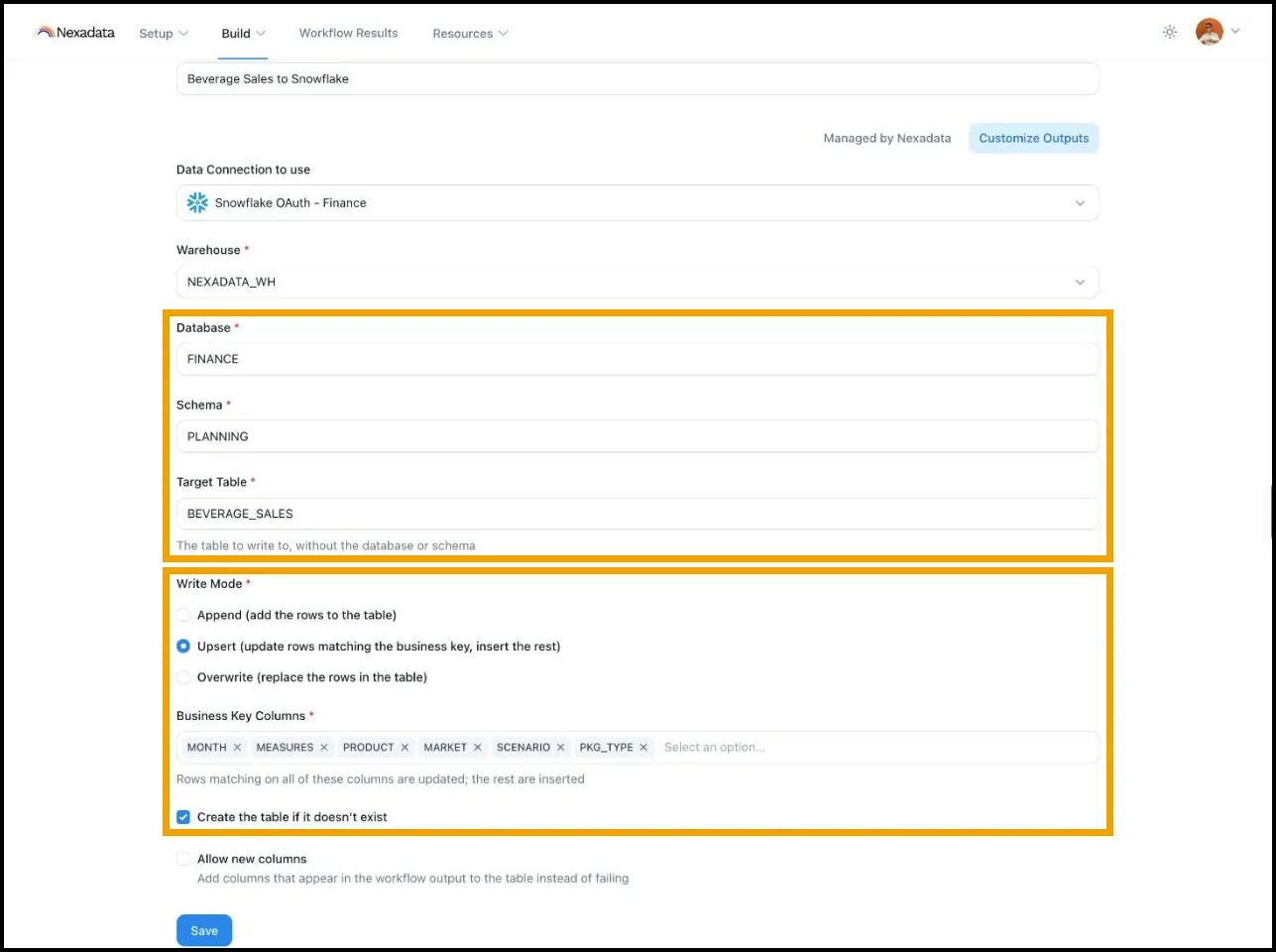
Send any Workflow output to a Snowflake table:
- Append adds the rows on each run.
- Upsert updates rows that match a business key you choose and inserts the rest, so a plan restated each cycle updates in place instead of piling up duplicates.
- Overwrite replaces the table’s rows and keeps the table itself, its columns, and its grants.
Nexadata can create the table on the first run and add new columns as your output evolves. Amounts land as exact decimals, so totals in Snowflake tie to the source to the cent. Column names arrive exactly as your team wrote them. Every row is stamped with the ID of the Workflow run that wrote it in a NEXADATA_RUN_ID column, so any row in the table traces back to its run. Results load through a temporary stage inside Snowflake, so there is no storage bucket of your own to set up.
Two Ways to Connect
- OAuth: you sign in to Snowflake through an OAuth integration your admin creates, and Nexadata acts as you.
- Key-pair: Nexadata connects as a Snowflake service user with an RSA key pair, so scheduled Workflows do not depend on any one person.
Either way, the role your admin grants limits what Nexadata can reach. One connection covers both reading and writing.
📄 Setting up a Snowflake Connection →
📄 Use Case: Round Trip Between Snowflake and Nexadata →
🏠 Nexadata Self-Hosted
Nexadata now runs inside your own infrastructure. The same platform ships as a Docker image that you deploy and operate, for teams whose data or policies keep them off a SaaS platform.
- Start small: a quickstart runs Nexadata, Postgres, and S3-compatible storage on a single host for evaluation
- Scale out: a production guide covers separate application and worker containers, clustering, load balancing, and an AWS ECS reference deployment
- Your AI provider: the AI features run on your own Anthropic API key or on Amazon Bedrock
- Your monitoring: telemetry exports over OpenTelemetry to the collector you already use
Access to the image comes with a Nexadata license key. Talk to us to get started.
🔁 Reuse Mapping Groups Through the MCP Server
When an AI assistant builds a pipeline through the Nexadata MCP server, it can now attach an existing Mapping Group instead of creating a new one, and place the step anywhere in the pipeline.
One Mapping Group can serve every pipeline that needs it. A SKU crosswalk shared by five pipelines is maintained in one place, and a change to a rule applies to all five. That keeps business logic centralized, whether a person or an AI assistant built the pipeline.
📄 Nexadata MCP Server Tool Reference →
📌 Pick Up Where You Left Off
Nexadata now remembers where you were working, so you stay in the context you chose instead of starting over each time:
- Sticky Workspaces: return to Workflows and Nexadata opens the Workspace you last used, not the default, even after a page refresh or a new session
- Sticky Labels: a Label filter you apply stays applied wherever Labels filter a list, such as when you select datasets for a template, so you see your short list instead of the full one. One click clears it.
- Yours alone: selections are saved per user, so your context never changes anyone else’s in the organization
If a remembered Workspace or Label is deleted, or you no longer have access to it, Nexadata simply falls back to the default Workspace or the full list.
That matters most when you keep separate Workspaces per platform, for example one for Anaplan and one for Pigment. Moving around the product no longer drops you back into the default Workspace, which is especially welcome in the middle of a demo.
🧱 Platform Fixes
- ENG-1103 · Bug Fix: After a run, Workflow output listed its columns alphabetically instead of in the order the Pipeline defines. The Output Schema, the results preview, and the output now keep the Pipeline’s column order.
- ENG-1090 · Bug Fix: Long-running Anaplan reads no longer fail with an “unauthorized” error partway through.
- ENG-1091 · Bug Fix: Supporting pipelines created through the Nexadata MCP server stayed hidden on the Workflow page until Enable Supporting Pipelines was clicked. They now appear right away.
- ENG-1095 · Bug Fix: A filter created through the Nexadata MCP server with
inverseset to true was saved as Keep matches. It is now saved as Exclude matches and removes the matching rows.
🔭 What’s Next
Nexadata Gateway. Some of the most important data never leaves the building: an ERP database in your data center, or an internal API that is not reachable from the internet. We’re building a lightweight agent that you install inside your network, so Nexadata can read that data without self-hosting the platform:
- On-premises databases and internal APIs: read from SQL Server, Oracle, PostgreSQL, and MySQL, and from internal REST and OData services
- No inbound ports: the agent connects out to Nexadata over a secure connection, so there are no firewall rules to open
- Credentials stay with you: database and API credentials can stay inside your network, and database access is read-only
- Runs where you do: Windows and Linux, with automatic updates
Thanks for being part of the Nexadata journey!
The Nexadata Team